Author: Tomothy Boyd

Is WordPress For Coding?

WordPress is a content management system (CMS) that allows users to easily create and manage websites without having to do any coding. However, this doesn’t mean that WordPress is not a platform for coding at all. In this article, we’ll explore the question: Is WordPress for coding?

First, it’s important to understand what coding is. Coding is the process of writing instructions in a computer language that a computer can understand and execute. Coding is used to create websites, software applications, and other digital products. There are several programming languages used for coding, including HTML, CSS, JavaScript, and PHP.

WordPress is built using PHP, which is a server-side scripting language used to generate dynamic content. While WordPress itself does not require users to do any coding, it does offer the ability for users with coding experience to customize their websites and add additional functionality.

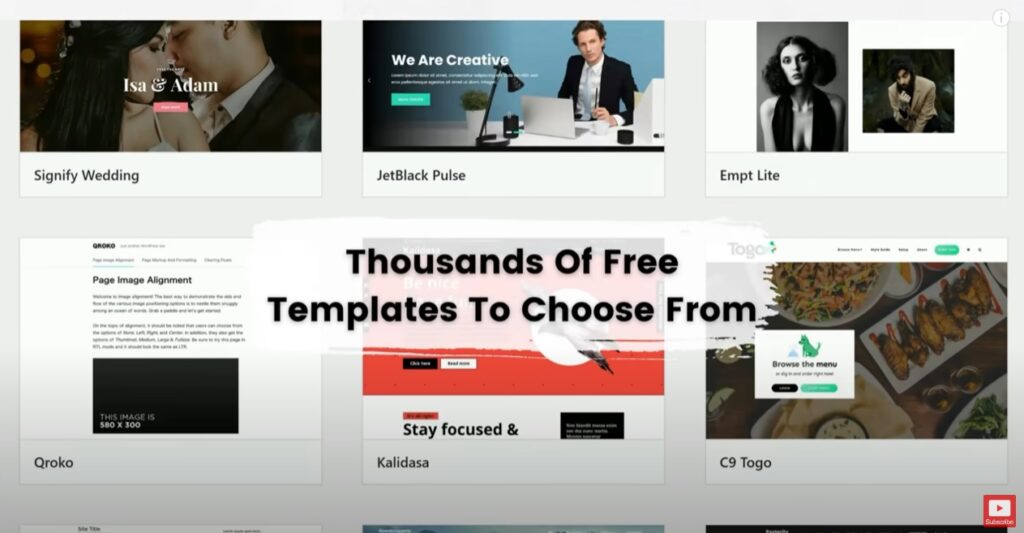
WordPress offers two ways to customize a website: themes and plugins. Themes are pre-built templates that change the look and feel of a website. WordPress offers thousands of themes to choose from, and many of these can be customized using the WordPress Customizer or CSS code. Users can also create their own themes from scratch or modify existing ones using PHP code.

Plugins, on the other hand, are code snippets that add specific functionality to a website. For example, a plugin might add a contact form, a gallery, or a social media sharing button to a website. WordPress has thousands of plugins available, and users with coding experience can create their own plugins to add custom functionality.

WordPress also offers a built-in code editor that allows users to modify the PHP, CSS, and JavaScript code of their website. This can be useful for making minor tweaks or customizations to a website without having to install and configure additional software.

So, while WordPress is not necessarily a platform for coding, it does offer options for users with coding experience to customize their websites and add additional functionality. However, for those who don’t have any coding experience, WordPress is still a great option for building a website without having to learn how to code.

WordPress is a content management system that offers the ability to create and manage websites without having to do any coding. However, users with coding experience can customize their websites and add additional functionality using themes, plugins, and the built-in code editor. So, whether you have coding experience or not, WordPress is a versatile platform that can be used to create a variety of websites.


Is WordPress A PHP or HTML?

Photo by cottonbro studio

WordPress is one of the most popular content management systems (CMS) on the internet. With millions of websites using WordPress, it’s a platform that can be customized and used for a variety of purposes. However, for those new to WordPress, it can be confusing to determine whether WordPress is based on PHP or HTML. In this article, we’ll answer the question: is WordPress a PHP or HTML?

The short answer is that WordPress is built on both PHP and HTML. However, there is a more detailed explanation that can help clarify what this means and how it works.

PHP is a server-side scripting language, meaning that it is executed on the server before the webpage is sent to the user’s browser. HTML, on the other hand, is a markup language that is used to structure content on a webpage. So, while PHP is responsible for generating the dynamic content, HTML is used to display that content in the browser.

WordPress is built on PHP and uses it extensively to generate dynamic content for webpages. When a user requests a page on a WordPress site, PHP is used to retrieve the necessary content from the database, generate the HTML markup for that content, and then send the resulting page to the user’s browser. This is all done on the server-side, meaning that the user only sees the final HTML markup that is generated by PHP.

While PHP is used extensively in WordPress, HTML is also an important part of the platform. The HTML markup generated by PHP is used to structure the content on the page and provide the necessary information to the user’s browser. This includes things like headings, paragraphs, images, and links, among others.

In addition to PHP and HTML, WordPress also uses other technologies such as CSS and JavaScript to provide additional functionality and styling to webpages. CSS is used to style the HTML markup generated by PHP, while JavaScript is used to add interactivity and dynamic behavior to the page.

So, to answer the question of whether WordPress is a PHP or HTML, the answer is that it is both. WordPress is built on PHP, which is used extensively to generate dynamic content, and HTML, which is used to structure and display that content in the user’s browser. In addition to these two technologies, WordPress also uses CSS and JavaScript to provide additional functionality and styling to webpages.

In conclusion, understanding the technologies that power WordPress is important for anyone looking to use the platform for their website. While PHP and HTML are the core technologies used by WordPress, it’s important to also have a basic understanding of CSS and JavaScript to take full advantage of what the platform has to offer.

Can You Make Money On Free WordPress?

Photo by Pixabay

WordPress is a popular content management system (CMS) that powers over 40% of all websites on the internet. One of the great things about WordPress is that it offers both free and paid versions, making it accessible to users with different budgets. However, many people wonder if it is possible to make money on the free version of WordPress. In this article, we will explore this question and provide some insights into how to monetize your free WordPress site.

Firstly, it is important to understand that there are two types of free WordPress sites. The first is the free WordPress.com site, which is a hosted platform that is limited in functionality and does not allow users to install custom themes or plugins. The second is the self-hosted WordPress site, which is the free open-source software that can be installed on your own web hosting server.

Can You Monetize a Free WordPress.com Site?

If you are using the free WordPress.com site, it is possible to monetize your site, but the options are limited. WordPress.com does not allow users to place their own advertisements on the site, but it does offer a WordAds program that allows you to earn revenue from ads placed on your site by WordPress.com. However, the WordAds program has strict eligibility requirements, and your site must meet specific criteria to qualify.

Another way to monetize your free WordPress.com site is through affiliate marketing. Affiliate marketing involves promoting other people’s products on your site and earning a commission for any sales made through your unique affiliate link. However, you need to be careful not to violate WordPress.com’s terms of service, which prohibits the promotion of affiliate links on free sites.

Can You Monetize a Self-Hosted Free WordPress Site?

If you are using the self-hosted version of WordPress, you have more flexibility when it comes to monetization options. Here are some of the ways you can make money from your self-hosted free WordPress site:

Advertisements: You can place your own advertisements on your site and earn revenue from clicks or impressions. Google AdSense is a popular advertising network that allows you to place ads on your site and earn money based on clicks.

Affiliate Marketing: As mentioned earlier, affiliate marketing is a great way to earn revenue from your site. You can promote products that are relevant to your audience and earn a commission for any sales made through your unique affiliate link.

Sponsored Posts: You can also make money by writing sponsored posts for brands or companies. Sponsored posts involve creating content that promotes a product or service and is paid for by the brand or company.

Sell Products: If you have a product to sell, such as an e-book or a course, you can sell it directly from your site. WordPress has many e-commerce plugins that make it easy to set up an online store.

Donations: If you have a loyal following, you can ask for donations to support your site. Many bloggers and content creators use platforms like Patreon or Ko-fi to accept donations from their audience.

It is possible to make money on a free WordPress site, but the options are limited compared to a self-hosted site. If you are using the free WordPress.com site, you can earn revenue through the WordAds program or affiliate marketing, but you need to be careful not to violate WordPress.com’s terms of service. If you are using the self-hosted version of WordPress, you have more flexibility when it comes to monetization options, including advertisements, affiliate marketing, sponsored posts, selling products, and donations. Ultimately, the key to making money on WordPress is to create high-quality content that resonates with your audience and provides value to them.

What Is The Disadvantage Of WordPress?

WordPress is one of the most popular content management systems (CMS) in the world. It powers over 40% of all websites on the internet, making it a top choice for businesses, bloggers, and individuals. However, like any technology, WordPress has its disadvantages. In this article, we will explore some of the most significant disadvantages of using WordPress.

1. Security Vulnerabilities
One of the biggest disadvantages of WordPress is that it is vulnerable to security attacks. Being such a popular CMS, it is a prime target for hackers who seek to exploit any vulnerabilities in the platform. While WordPress takes security seriously and regularly releases updates to address security issues, it is up to individual users to keep their sites secure. This can be time-consuming and requires technical expertise, which not all users possess.

2. Technical Expertise
While WordPress is user-friendly and easy to use, it still requires some technical expertise to set up and customize. For instance, you need to have some understanding of web development, HTML, CSS, and PHP to make significant customizations to your site. This can be a barrier to entry for those who lack technical expertise or those who do not have the budget to hire a professional developer.

3. Plugin Compatibility Issues
WordPress is highly customizable, and there are thousands of plugins available to extend its functionality. However, not all plugins are created equal, and some can cause compatibility issues with other plugins or the WordPress core itself. This can result in unexpected behavior, errors, or even website crashes. Additionally, not all plugins are regularly updated, which can leave your site vulnerable to security issues.

4. Website Speed
While WordPress is generally fast and performs well, it can be slower than a custom-built website or other CMS platforms. This is because WordPress relies on plugins and themes to add functionality, which can add bloat and slow down the site’s performance. Additionally, poorly coded plugins or themes can cause performance issues that affect the user experience.

5. Maintenance and Updates
WordPress requires regular maintenance and updates to ensure that the site remains secure and up-to-date. This includes updating the core WordPress software, themes, and plugins. However, not all updates are compatible with each other, which can result in compatibility issues and website crashes. Additionally, some updates may cause conflicts with other plugins or themes, requiring further troubleshooting and technical expertise.

6. Learning Curve
While WordPress is user-friendly, there is still a learning curve involved in using the platform effectively. This includes understanding how to install and configure plugins, themes, and other customizations. Additionally, while there are many tutorials and resources available, it can be overwhelming for beginners to navigate the vast amount of information and options available.

7. Limitations
WordPress is a powerful CMS, but it still has limitations. For instance, while it can be used to create almost any type of website, it may not be the best choice for highly customized or complex websites. Additionally, WordPress can be limiting when it comes to design and layout options, especially when compared to a custom-built website.

While WordPress is an excellent choice for many users, it does have its disadvantages. These include security vulnerabilities, technical expertise requirements, plugin compatibility issues, website speed, maintenance and updates, learning curve, and limitations. However, many of these disadvantages can be mitigated with proper planning, regular maintenance, and technical expertise. Ultimately, the best choice will depend on your specific needs and goals for your website.

Which Is Better, A Website Or A WordPress?

When it comes to building a website, there are many different platforms to choose from. Two of the most popular options are building a website from scratch and using WordPress. Both approaches have their pros and cons, and the best choice will depend on your specific needs and preferences.

Building a website from scratch means creating a custom design and coding it using HTML, CSS, and other programming languages. This approach gives you complete control over the design and functionality of your website. You can create a unique look and feel, customize every element of the site, and add any functionality that you need.

However, building a website from scratch requires technical expertise, and it can be time-consuming and costly. Unless you have the skills and experience to create a website from scratch, you’ll likely need to hire a professional developer to help you.

On the other hand, WordPress is a popular content management system (CMS) that allows you to create a website without the need for coding or technical expertise. WordPress is a versatile platform that can be used to create blogs, e-commerce sites, business websites, and more. With its user-friendly interface and a wide range of plugins and themes, WordPress makes it easy to create a professional-looking website quickly.

Here are some factors to consider when deciding whether a custom-built website or a WordPress site is the best option for you:

Cost
Building a website from scratch can be expensive, as it requires technical expertise and a lot of time. Depending on the complexity of the site, you may need to hire a team of developers, designers, and project managers to create the website. In contrast, WordPress is a cost-effective option as it allows you to create a website without the need for technical expertise or a large budget. There are many free and paid themes and plugins available that can help you create a professional-looking site without breaking the bank.

Customization
Building a website from scratch gives you complete control over the design and functionality of your site. You can create a unique look and feel, customize every element of the site, and add any functionality that you need. In contrast, while WordPress allows for a significant degree of customization, it may be limited by the capabilities of the platform and the plugins and themes available. While there are many customization options available, you may need to compromise on some elements of the design or functionality.

Technical Expertise
Creating a website from scratch requires technical expertise, including coding skills and an understanding of web development. In contrast, WordPress is user-friendly and does not require coding or technical expertise. This means that anyone, regardless of technical skill level, can create a website using WordPress.

Scalability
Building a website from scratch can be scalable, but it depends on the approach taken. If the website is built on a scalable platform and is designed with scalability in mind, it can be easily expanded as the business grows. WordPress is a scalable platform that can be used to create websites of any size, from small blogs to large e-commerce sites. With its wide range of plugins and themes, WordPress can be easily customized and expanded as needed.

Maintenance
Maintaining a custom-built website requires technical expertise and ongoing maintenance to ensure that the site remains up-to-date and secure. In contrast, WordPress takes care of much of the maintenance and security updates automatically. WordPress also offers a wide range of plugins and themes that can help you manage your site’s content and optimize it for search engines.

Whether a custom-built website or a WordPress site is the better option depends on your specific needs and preferences. If you have the technical expertise and budget to create a website from scratch, then a custom-built website may be the best option. However, if you’re looking for a cost-effective, user-friendly, and scalable platform, then WordPress is an excellent choice.

7 Kinds Of Websites WordPress Is Used For

Photo by Canva Studio

WordPress is one of the most popular content management systems (CMS) in the world, powering over 41% of all websites on the internet. It is a flexible platform that can be used for a wide range of websites, from personal blogs to large e-commerce sites. In this article, we will explore what kind of websites WordPress is used for and why it is such a popular choice for website development.

1. Blogs
WordPress was initially created as a blogging platform, and it remains a popular choice for bloggers today. With its user-friendly interface, bloggers can easily create and publish blog posts, manage comments, and customize their website’s design. WordPress also offers a wide range of plugins specifically designed for bloggers, such as Yoast SEO, which helps optimize blog content for search engines.

2. E-commerce
WordPress can also be used to create e-commerce websites, using plugins such as WooCommerce, which is one of the most popular e-commerce platforms on the internet. With WooCommerce, users can create online stores, manage orders, and payments, and customize their website’s design to match their branding.

3. Business Websites
WordPress is also an excellent platform for businesses of all sizes. With its user-friendly interface and flexibility, businesses can create professional-looking websites, showcase their products and services, and even create employee portals or intranets. WordPress also offers a wide range of plugins that businesses can use to add custom features to their websites, such as appointment scheduling, email marketing, and customer relationship management.

4. Portfolio Websites
WordPress is an excellent platform for creatives, such as photographers, designers, and artists, to showcase their work. With its user-friendly interface, creatives can create visually appealing portfolio websites, showcase their work, and even sell their services. WordPress also offers a wide range of portfolio themes that creatives can use to create a custom look and feel for their website.

5. Educational Websites
WordPress can also be used to create educational websites, such as online courses, e-learning platforms, and education blogs. With plugins such as LearnDash, users can create and manage online courses, track student progress, and even issue certificates upon completion. WordPress also offers a wide range of education themes that users can use to create a custom look and feel for their website.

6. Non-Profit Websites
WordPress is an excellent platform for non-profit organizations, such as charities and NGOs, to create a website and raise awareness for their cause. With plugins such as GiveWP, users can create donation forms, manage donations, and even send out thank you emails to donors. WordPress also offers a wide range of non-profit themes that users can use to create a custom look and feel for their website.

7. Membership Websites
WordPress is also an excellent platform for membership websites, such as subscription-based services, online communities, and membership-based clubs. With plugins such as MemberPress, users can create and manage memberships, restrict content to certain user groups, and even send out email notifications. WordPress also offers a wide range of membership themes that users can use to create a custom look and feel for their website.

WordPress is an incredibly versatile platform that can be used for a wide range of websites. From blogs and e-commerce sites to business websites and educational platforms, WordPress offers flexibility, user-friendliness, and customization options that make it a popular choice for website development. Whatever your website’s purpose, WordPress is an excellent choice for creating a professional and functional website that meets your needs.

Is WordPress Good For Beginners?

When it comes to creating a website, beginners often turn to WordPress as it is one of the most popular content management systems available. WordPress is a user-friendly platform that allows users to create and manage websites without any coding experience. In this article, we will examine whether WordPress is good for beginners, exploring its features, benefits, and drawbacks.

What is WordPress?

WordPress is an open-source content management system (CMS) that allows users to create and manage websites. It was first released in 2003 and has since grown to become the most popular CMS in the world. According to W3Techs, WordPress powers 41% of all websites on the internet.

WordPress is a self-hosted platform, which means that users need to purchase their own domain name and hosting plan. However, many web hosting providers offer WordPress-specific plans that make it easy to install and manage the platform.

Is WordPress Good for Beginners?

The short answer is yes, WordPress is an excellent platform for beginners. Here are some reasons why:

Easy to Use
WordPress is designed to be user-friendly and intuitive. The platform features a visual editor that allows users to create and edit content without any coding experience. Users can also customize their website’s design using pre-made themes and plugins.

Flexible
WordPress is a highly flexible platform that can be used for a wide range of websites, from blogs to online stores. It is also highly customizable, allowing users to add custom features and functionality to their websites using plugins and widgets.

SEO Friendly
WordPress is SEO friendly, meaning it is optimized for search engines like Google. It includes features like clean URLs, automatic sitemaps, and easy integration with SEO plugins like Yoast SEO.

Large Community
WordPress has a large and active community of developers and users. This means there are plenty of resources and support available for beginners who need help with their websites.

Cost-Effective
WordPress is a cost-effective platform, as it is free to download and use. Users only need to pay for their domain name and hosting plan.

Drawbacks of WordPress for Beginners

While WordPress is an excellent platform for beginners, there are a few drawbacks to consider:

Security
WordPress is a popular platform, which makes it a target for hackers. Users need to take steps to secure their websites, such as using strong passwords and keeping their plugins and themes up-to-date.

Updates
WordPress frequently releases updates to improve security and functionality. While updates are important, they can also be time-consuming and may require users to test their website to ensure everything is working correctly.

Learning Curve
While WordPress is easy to use, there is still a learning curve for beginners who are not familiar with the platform. Users may need to spend some time learning how to use WordPress’s features and customizing their website to their liking.

WordPress is an excellent platform for beginners who want to create a website. It is easy to use, flexible, SEO friendly, and cost-effective. However, users need to be aware of its drawbacks, such as security issues, updates, and a learning curve. With the right approach, beginners can create a professional and functional website using WordPress.

What is the Benefit of WordPress?

from youtube

WordPress is a free and open-source content management system (CMS) that allows users to create and manage websites with ease. It is one of the most popular CMS platforms in the world, powering over 40% of all websites on the internet. In this article, we will explore the benefits of using WordPress for your website.

1. User-friendly interface
One of the main benefits of WordPress is its user-friendly interface. With a simple and intuitive interface, WordPress makes it easy for users of all skill levels to create and manage their own websites. Users can easily add new pages and blog posts, update existing content, and customize the look and feel of their website with just a few clicks.

2. Customizable design
WordPress offers a wide range of customizable design options, making it easy to create a unique and professional-looking website. Users can choose from thousands of free and premium themes, each with its own design and functionality. They can also customize the look and feel of their website by adding custom logos, headers, and backgrounds, as well as choosing their own color scheme.

3. Plugins
WordPress also offers a vast library of plugins that allow users to extend the functionality of their website. Plugins are add-ons that can be installed on a WordPress site to add new features or enhance existing ones. For example, users can install plugins to add social media sharing buttons, create contact forms, improve search engine optimization (SEO), and much more.

4. SEO-friendly
WordPress is designed with SEO in mind, making it easy to optimize your website for search engines. The platform automatically generates SEO-friendly URLs, and users can easily optimize their pages and posts for keywords and meta descriptions. There are also a variety of plugins available to help improve SEO, such as Yoast SEO, which offers a range of features to help users optimize their content.

5. Mobile-responsive
In today’s world, having a mobile-responsive website is essential. WordPress offers a range of mobile-responsive themes, allowing users to create websites that look great on any device. Users can also use plugins to enhance the mobile responsiveness of their website, ensuring that their website is accessible to users on all devices.

6. Community support
WordPress has a vast and active community of users, developers, and contributors, which means that help is always at hand when you need it. Users can turn to online forums, documentation, and tutorials for help with any aspect of their website, and developers can contribute to the platform by creating new themes and plugins or by providing support to other users.

7. Cost-effective
Perhaps one of the biggest benefits of WordPress is that it is cost-effective. The platform is free to use, and users can create and manage their own websites without needing to hire a web developer. Even premium themes and plugins are relatively affordable, making it easy for users to create a professional-looking website without breaking the bank.

Conclusion

In conclusion, WordPress offers a range of benefits that make it an ideal platform for creating and managing websites. Its user-friendly interface, customizable design options, vast library of plugins, SEO-friendliness, mobile-responsiveness, community support, and cost-effectiveness make it a popular choice for users of all skill levels. Whether you are a blogger, small business owner, or web developer, WordPress has something to offer.

Should I Learn PHP Before WordPress?

Photo by Pixabay

WordPress is one of the most popular content management systems (CMS) in the world, powering over 40% of all websites on the internet. WordPress is built on PHP, a server-side scripting language that is used to create dynamic web pages and web applications. Many people wonder if they should learn PHP before learning WordPress. In this article, we will explore the advantages and disadvantages of learning PHP before WordPress and offer some guidance on the best approach.

Advantages of learning PHP before WordPress

Better understanding of programming concepts: Learning PHP before WordPress can give you a better understanding of programming concepts like variables, functions, loops, and conditional statements. This can make it easier for you to understand how WordPress works and how to customize it.

Greater control over your code: Learning PHP can give you greater control over your code, allowing you to create custom WordPress themes and plugins that meet your specific needs. With a deeper understanding of PHP, you can create more advanced WordPress websites with more complex functionality.

Easier to troubleshoot errors: If you have a solid foundation in PHP, you will be better equipped to troubleshoot errors and debug your code. This can save you time and frustration when working on WordPress websites.

Disadvantages of learning PHP before WordPress

Steep learning curve: Learning PHP can be challenging, especially if you are new to programming. It may take longer to learn PHP before diving into WordPress, which can delay your ability to create websites.

Not necessary for basic WordPress websites: If you only plan to create basic WordPress websites, you may not need to learn PHP at all. Many WordPress themes and plugins are available that do not require any knowledge of PHP.

Learning by doing: Many people prefer to learn by doing, and starting with WordPress can be a great way to learn PHP. By starting with WordPress, you can learn PHP as you go, working with practical examples and real-world applications.

Best approach: Learn PHP and WordPress simultaneously

The best approach to learning PHP and WordPress depends on your goals and experience. If you are new to programming, it may be beneficial to start with a basic understanding of PHP before diving into WordPress. However, if you are comfortable with programming concepts and want to create WordPress websites quickly, you can start with WordPress and learn PHP as you go.

Regardless of where you start, it is important to keep learning and growing. PHP and WordPress are both complex tools with a lot to offer. The more you learn, the more you can do with these tools and the more valuable you will be as a web developer.

Conclusion

In conclusion, there is no definitive answer to whether you should learn PHP before WordPress. It ultimately depends on your goals, experience, and learning style. If you are new to programming, learning PHP first may be beneficial, but if you are comfortable with programming concepts and want to create WordPress websites quickly, you can start with WordPress and learn PHP as you go. Regardless of your approach, it is important to keep learning and growing to become a skilled and valuable web developer.

Which is Better PHP or WordPress?

Photo by Tim Gouw

When it comes to web development, PHP and WordPress are two popular options that have been around for years. PHP is a server-side scripting language, while WordPress is a content management system (CMS) built on PHP. While they are not directly comparable, people often ask which one is better. In this article, we will explore the differences between PHP and WordPress, their strengths and weaknesses, and which one might be better for your specific needs.

What is PHP?

PHP is a server-side scripting language that is used to create dynamic web pages and web applications. PHP code is executed on the server before being sent to the client’s browser, which means that the client only sees the final output of the PHP code. PHP is open-source, easy to learn, and works well with various web servers and operating systems.

What is WordPress?

WordPress is a content management system (CMS) that is built on PHP. WordPress is a popular platform for creating websites, blogs, and online stores, and it has a large community of developers and users. WordPress is open-source, easy to use, and customizable, with a wide range of themes and plugins available.

Strengths and weaknesses of PHP

Strengths:

Flexibility: PHP is a versatile language that can be used to create a wide range of web applications, from simple web pages to complex web applications.

Wide community: PHP has a large community of developers who create libraries, frameworks, and tools that make it easier to work with PHP.

Platform independence: PHP code can run on a wide range of platforms and operating systems, including Windows, Linux, and macOS.

Weaknesses:

Security: PHP has a reputation for being vulnerable to security attacks if not written properly. However, this can be mitigated by following best practices and using secure coding techniques.

Speed: PHP can be slower than other languages like Java and C++, especially when handling large amounts of data.

Strengths and weaknesses of WordPress

Strengths:

Easy to use: WordPress is known for its user-friendly interface, making it easy for beginners to create a website without having to learn how to code.

Customizability: WordPress has a wide range of themes and plugins available, making it easy to customize the look and functionality of a website.

SEO-friendly: WordPress is designed to be SEO-friendly, with features like customizable permalinks, image optimization, and integration with popular SEO plugins.

Weaknesses:

Security: Like PHP, WordPress is vulnerable to security attacks if not secured properly. However, this can be mitigated by using security plugins, keeping the platform up-to-date, and following best practices.

Performance: WordPress can be slower than other CMS platforms when handling large amounts of data or when using poorly optimized themes or plugins.

Which one is better for you?

When it comes to choosing between PHP and WordPress, it ultimately depends on your specific needs and goals. If you are a developer looking to create a custom web application from scratch, PHP may be the better choice. However, if you are a blogger or small business owner looking to create a website without having to learn how to code, WordPress may be the better option.

If you are looking for a platform that is easy to use, customizable, and has a wide range of themes and plugins available, WordPress is a great choice. However, if you need more control over your web application and want to create something unique, PHP may be the better choice.

Conclusion

In conclusion, PHP and WordPress are both powerful tools for web development, each with their own strengths and weaknesses. While PHP is a programming language used to create dynamic web pages and web applications, WordPress is a content management system built on PHP. Ultimately, the choice between PHP and WordPress depends on your specific needs and goals. If you are looking for an easy-to-use platform with a large community and a wide range of themes and plugins available, WordPress is a great choice. On the other hand, if you need more control over your web application and want to create something unique, PHP may be the better choice.